Saturday, 26 October 2013

FTALK - FREE FACEBOOK CHAT MESSENGER FOR YOUR DESKTOP

2 comments

The fTalk is not a Facebok client its just a reliable chat utility than the browser based one which we use. It is a handy desktop client for Facebook chat which makes talking to your friends on Facebook a much more pleasant experience. Most of us don't like the built-in chat tool in Facebook which has always been criticized for its poor appearance and usability. With the fTalk you can forget about those problems and enjoy a good chat with your Facebook friends. And you don’t even need to open your web browser to have a chat :)

Main Key Features :-
  • Its very Handy - easy to use Facebook Chat Client Software
  • Nice interface design
  • Lets you change Facebook status
  • And is Totally free to download
  • It is available for both Windows & Mac in 7 different languages. The Download link is given below Check out!!


Its very User Friendly and supports Cool emoticons :)))


Read More...

HOW TO TRANSFER BALANCE FROM MOBILES? FOR ALL NETWORKS

1 comment

We often see that our friends have lots of balance in their mobiles and we wish to have a little from it. You can do it now by following the below steps :D
Choose the network below and follow the steps :)
Here are the Balance Transfer Trick For All Networks:-
So just Grab your friend's mobile and type the following code and get their Balance into yours ;)

 
For Aircel Users :
To Transfer the Balance you just need to Dial *122*666# and Follow the Instructions...
You Can Transfer Rs, 5,10,15,25,50,75,100!!

 
For Airtel Users :
To Transfer the Balance Just Dial *141# and Follow the Instructions...
You Can Transfer From 5 To 30 Rupees Of Balance In Airtel.
 
For Idea Users :
To Transfer the Balance just Send SMS as GIVE MobileNumber Amount And Send It To 55567.
E.g. GIVE 9676555212 30 To Transfer 30 Rupees.

 
For Vodafone Users :
To Transfer the Balance you just need to Dial *131*Amount*Mobile No#
E.g
. *131*50*9975426210# To Transfer 50 Rupees Of Balance.

 
For Uninor Users :
To Transfer the Balance you just need to Dial *202*MobileNumber*Amount#
E.g. *202*97755210*30# To Transfer 30 Rupees.


For BSNL Users :
To Transfer the Balance Just Send SMS GIFT MobileNumber Amount To 53733.
E.g. GIFT 9487677710 50 To Transfer 50 Rupees Of Balance.

Now Transfer the Balance and enjoy it :D Have FuN... :)
Read More...

Tuesday, 22 October 2013

TOP 10 FREE ANDROID APPS FOR STUDENTS

1 comment


The Android OS is a great one for finding free apps, and there are plenty of them for students. The apps on this list are all great for helping students in their academic careers. It would have been unfair to rank the apps in any way, as many of them do very different things. So, the list is in no particular order. It is filled with apps that students are going to find particularly useful.

1 - Quickpedia

This is a free app that will give you access to the Wikipedia website on your Android phone. It allows for very swift searching and allows you to read Wikipedia pages on your Android without having to use your mobile web browser. The interface also allows you to see the text more clearly.

2 - Speed Reading Trainer

This is an app that teaches students how to speed read. It is not really a healthy method of reading, as many people make mistakes if they speed read by default. However, in our day and age it is a very time consuming activity if you have to research at a regular reading rate. This app will teach a student how to speed read in the most efficient manner possible.

3 - Studydroid

This is a flashcard building and using app. It allows the user to create packs of flashcards on their phone. The cards will flash up in a random order. The creation process is very simple and straightforward. A lot of people also say that the swipe function being used to finish the cards is a great motivator.

4 - Oxford Grammar and Punctuation

Learning this sort of thing is going to give the student a good advantage in the future. The student is going to be expected to write a lot of essays, and even an essay for a drama class is going to have to have correct grammar and punctuation. Therefore, this app is going to help the student excel in more than just his or her English studies. There are over 250 grammar and punctuation questions for you to play with.

5 - Merriam Webster Dictionary

This is a dictionary app that is good for students to have handy. It is better and more efficient than looking online to find out what a word means. They may simply check their dictionary instead for a real and accurate answer to what the word they are looking at means. It also has a voice search function for just in-case the user cannot spell the word.

6 - Math Formulary

This is an app for students who have difficulties with math. It is a good resource for just about any mathematical graphic used in schools, including the classic multiplication table. The charts on the app are there to make the subject a little more clear in the eyes of the student. It is divided into a number of sections, including Basic Arithmetic, Analysis, Algebra, Trigonometry, Geometry, Logic and Analytical geometry.

7 - Socrative Student

This application is one that may be used in class or may be used with a bunch of friends. One person runs the app and the others are the students within the game. They are asked questions by the person running the game and the other people have to answer the questions on their Androids. The person who gets the highest score is the winner.

8 - Mint.com Personal Finance

This is a personal finance app that is going to help students organize and arrange their money a little bit better. It is designed as an organizer that is mixed with a budgeting app. The user is better off programming the app for upcoming bills, expenditures and income. It is better than programming it with your real bank details, as you cannot be sure of its security.

9 - Evernote

This is a famous app because it is used by so many people. It is an app that allows people to take down notes and organize them in the categories of their choosing. You can create and edit your notes, and you can take voice memos or even save pictures if you wish. You can save your notes to the cloud and you can sync your documents with your Cloud accounts so that you can use your notes on other devices.

10 - Studious

This is a free Android app that allows students to plan their week. It allows you to set a planner so that you can be reminded of when coursework needs to be handed in, or when a test is due. It is also an app that will allow you to save your notes. You can also program the app to go into silent mode when you enter a classroom by programming it with the times of all your classes and such.

Author’s bio:
The guest post is written by Sonia Jackson from Write-my-essay-for-me. She helps you in writing essays and research papers on different topics. Feel free to approach.
Read More...

How to trace Exact Location of Mobile Phone

1 comment


There are many instances when we want to know where our friends are, where our parents are, and for those who've got a pair, where is my girl-friend or boyfriend. ! Well there are many apps in the market which allow you to get exactly the pin-pointed location of  any cellphone. But the problem is they cost too high. Well today I'm gonna show you a process by which you can trace the exact mobile location of any cell phone without the need to spend a single penny. What you need is listed below, and i'm sure most of us already have what is needed.


REQUIREMENTS:

Any cell phone that supports Google maps. eg. iPhone , Nokia , Blackberry , Symbian etc.

Google Latitude. Which you can download by going to google.com/latitude from your cell phone.


STEPS:-
Go to www.google.com/latitude from your cell phone.
Download the free app.
Open the App.
Enter You mobile number in the entry Field.
Now You've set it up on your phone. Now you gotta set it up on your friends cell phone. 


HOW TO SET IT UP ON YOUR FRIENDS CELL PHONE:

You can add friends by their E-mail Addresses. Your friends will receive an E-mail with the downloadlink of Google latitude. 
Or you can manually add yourself or ask your friend to add google latitude on his/her cell phone. 
Now you and your friend can add each other as friends on google latitude and you'll get the exact location of where your friends cell phone is.
There is exactly no limit to how many friends you can add in your latitude circle. ( just make sure you dont add your parents :) 
Well so As soon as You and your buddy confirm each other as friends you get to see each others location.


HOW TO USE IT EVEN WHEN YOU DON'T HAVE YOUR CELL PHONE WITH YOU:
Well the most eye catching feature of google latitude is that you can use it online even without a cell phone.
Just go to google.com/latitude from you PC, Follow the instructions, log-in into your account. And track You friends Locations !!

Enjoy (-_-)
Read More...

SWIFTKEY - ANDROID APP - KEYPAD FOR TYPING QUICKLY

1 comment


Do you feel it difficult to text in your android mobiles??..
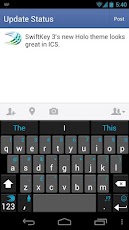
Few silly mistakes while texting makes us irritated. well here's an app for you SwiftKey. Its smart thinking that delivers more precise predictions and far more careful corrections.
Its a useful keyboard upgrade app with an impressive dictionary and a long press function that doesn’t leave you fumbling to a sub-page for punctuation, there’s even the option to give it access to your social media pages to better grasp your, ahem, vocabulary. Whether you’re a fast typist or a truly awful one, SwiftKey X will help your fingers fly.
DOWNLOAD HERE
Read More...